Time setting
Model 8T63 is provided with a 24-hour hand.
The 24-hour hand moves in conjunction with the hour hand, and it can be used to check whether the displayed time is AM or PM.
8T61, and 8T67 do not have a 24-hour hand.
-
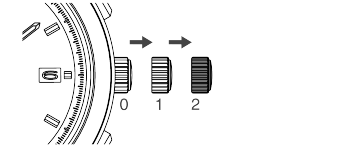
Pull out the crown to the second click.
-
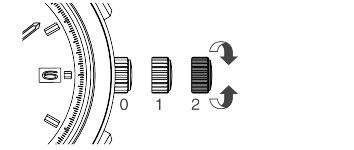
Turn the crown to set the time.
-
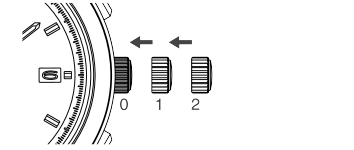
Push the crown back in to the normal position in accordance with a time signal.
Pull out the crown to the second click when the small seconds hand is at the 12 o’clock position; the small seconds hand stops on the spot.
For models with screw down crown, please unlock the crown before operating it.
When setting the time, make sure that AM/PM is set correctly.
The date changes once every 24 hours.
8T63 can use the 24-hour hand to check whether the displayed time is a.m./p.m.
How to set the date
In order to set the time accurately, turn the minute hand 4 to 5 minutes ahead and then return it to the correct time.
When the stopwatch is measuring, the stopwatch hand will work continuously.
The small seconds hand will start moving.
The telephone time signal service is helpful for setting the small seconds hand exactly.
For models with screw down crown, please be sure to lock the crown after operating it.
How to set the date
The watch is provided with a date function. It is designed so that the date changes once every 24 hours.
The date changes around 12 o’clock midnight. If AM/PM is not properly set, the date will change at “12 o’clock noon.”
Some model designs may not have the date function.
CAUTION
Do not set the date between 9:00 p.m. and 3:00 a.m.
Amending the date during this time period may cause problems such as the date failing to change the next day.
-
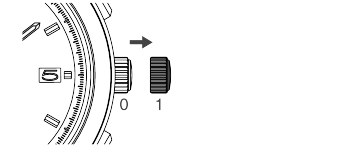
Pull out the crown to the first click.
-
Turn the crown clockwise to set the date
-
Push the crown back in to the normal position.
For models with screw down crown, please unlock the crown before operating it.

For models with screw down crown, please be sure to lock the crown after operating it.
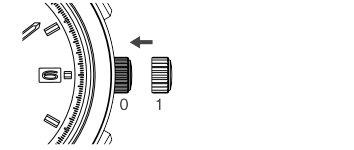
Performing the above operation on models without a date function will not change the display.
This is due to product specifications, not a malfunction or defect.
Date adjustment at the end of the month
It is necessary to adjust the date at the end of February and 30-day months.
Ex.) To adjust the date in the A.M. period on the first day of a month following a 30-day month
The watch displays “31” instead of “1”. Pull out the crown to the first click.
Turn the crown to set the date to “1” and then push the crown back in to the normal position.
For models with screw down crown, please be sure to lock the crown after operating it.
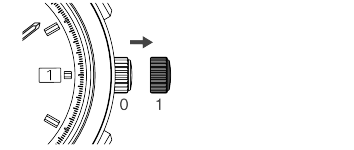
CAUTION
Avoid amending the date when the watch is displaying between 9 PM and 3 AM. Doing so may cause damage.